

7 Costly Phone Repair Shop Management Mistakes (And How to Fix Them)
Running a successful phone repair shop requires far more than technical expertise. While repairing cracked screens, replacing batteries, and diagnosing motherboard faults are essential skills, many repair businesses struggle because of inefficient operational processes rather than poor repair quality.
Lost repair tickets, misplaced devices, delayed customer approvals, inventory shortages, constant status enquiry calls, and inconsistent technician workflows can quietly reduce profits and limit business growth. Over time, these small operational problems create frustrated customers, overworked staff, and unnecessary administrative work that takes valuable time away from actual repairs.
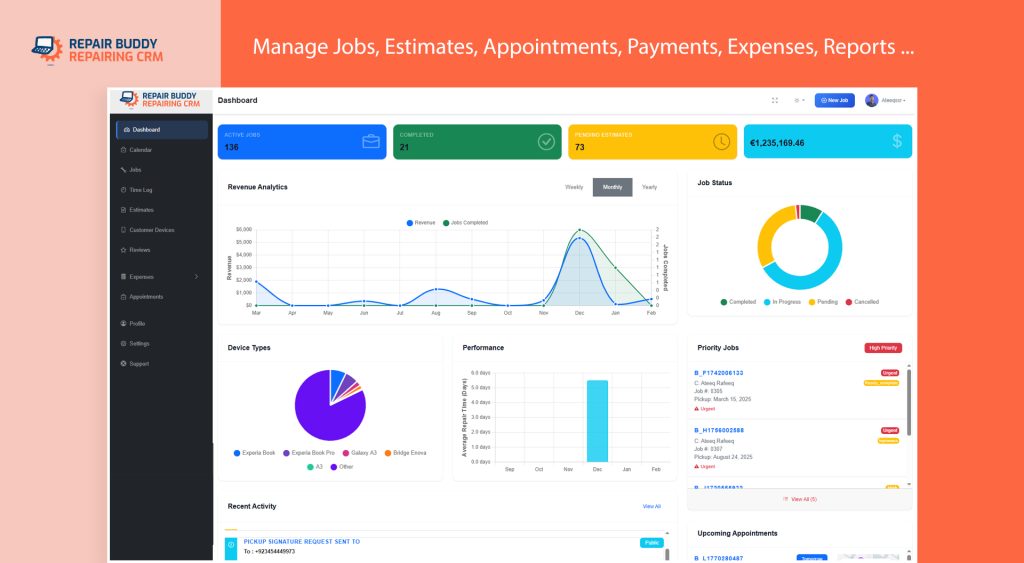
The good news is that most of these challenges are completely preventable. By introducing standardized workflows and replacing manual processes with digital systems, repair shops can improve productivity, reduce costly mistakes, and provide a much better customer experience.
In this guide, we’ll look at seven of the most common phone repair shop management mistakes we see in repair businesses and explain practical ways to solve each one. Whether you operate an independent mobile phone repair shop or manage multiple repair locations, these improvements can help your business become more organized, more efficient, and more profitable.
What You’ll Learn
- How to create a more organized repair workflow.
- Why standardized repair intake protects your business.
- How better technician management improves productivity.
- Ways to reduce customer status enquiry calls.
- How inventory management affects repair profitability.
- Simple workflow improvements used by successful repair shops.
- When repair shop management software becomes a worthwhile investment.
Some of these improvements require nothing more than better processes, while others become significantly easier when supported by dedicated phone repair shop management software. We’ll discuss both approaches throughout this guide so you can decide what works best for your business.
Mistake #1: Accepting Repairs Without a Standard Intake Process
Every successful repair begins with accurate information. Unfortunately, many repair shops still rely on handwritten notes, memory, or inconsistent intake procedures when accepting customer devices. While this may seem manageable during quieter periods, the problems become obvious as repair volume increases.
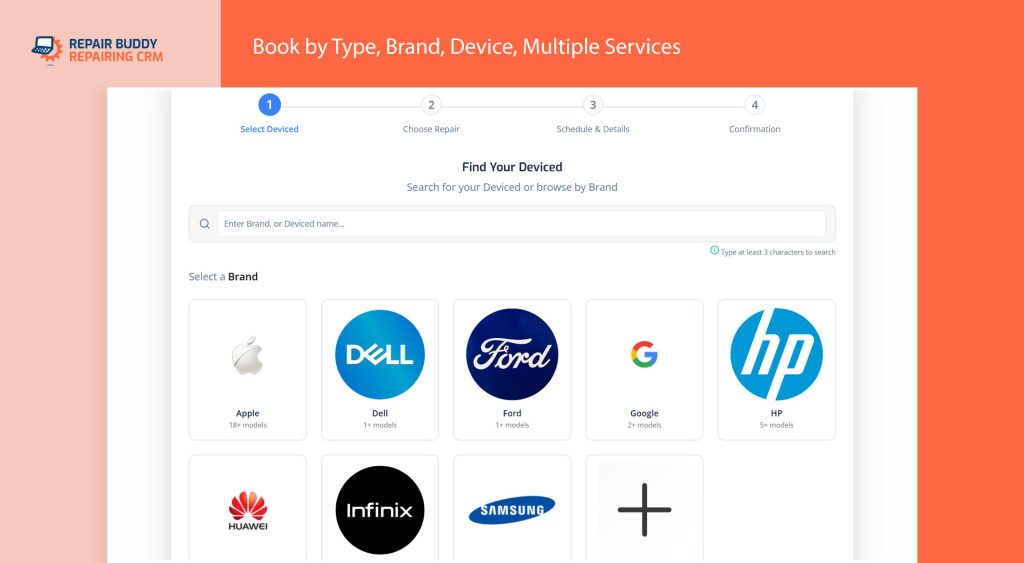
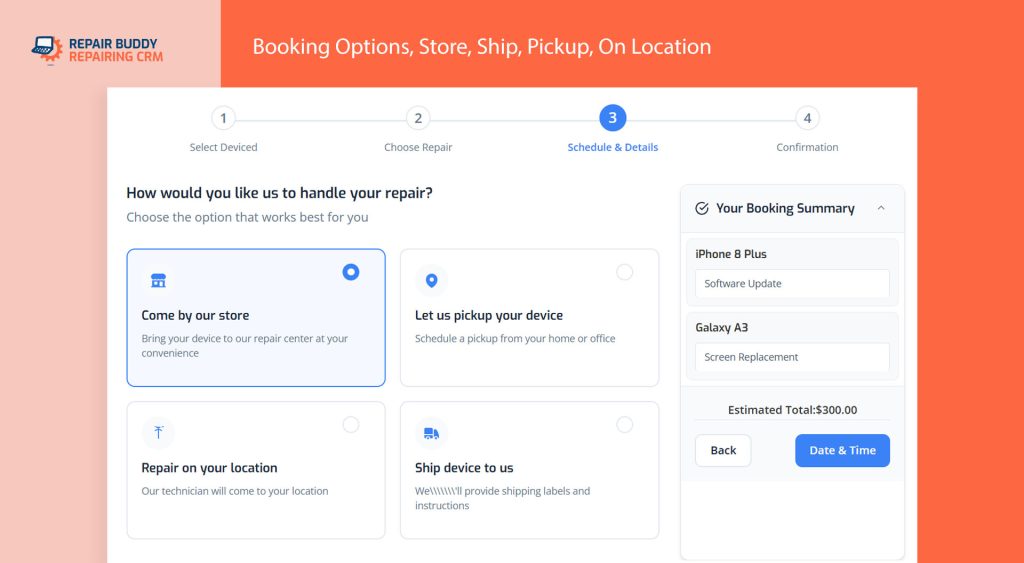
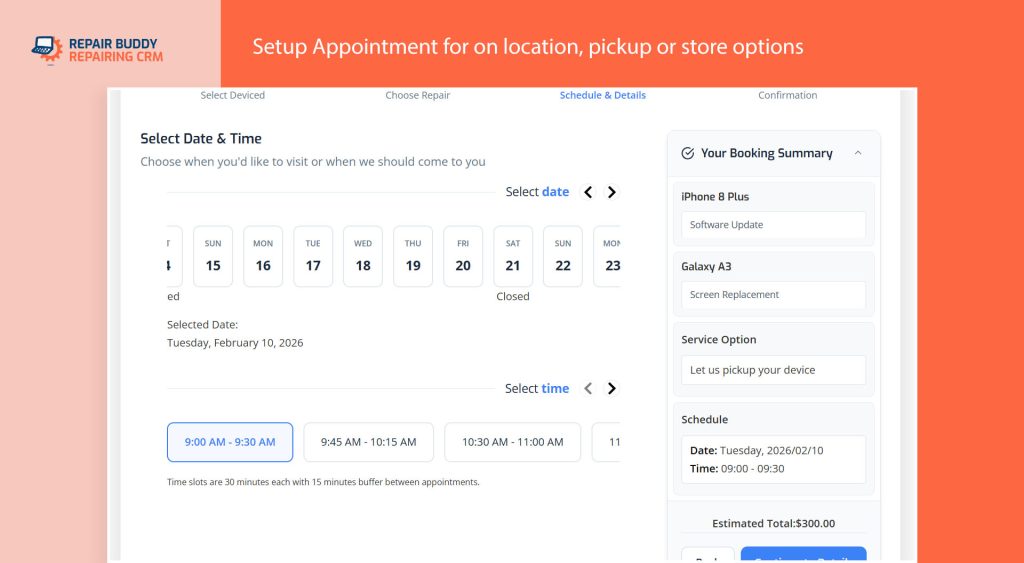
Missing IMEI numbers, forgotten accessories, undocumented cosmetic damage, incomplete customer information, or vague fault descriptions can all lead to confusion later in the repair process. These small oversights often result in unnecessary phone calls, delayed repairs, customer disputes, and additional administrative work.
A standardized repair intake process ensures that every device is checked in using the same procedure, regardless of which employee is working at the front counter. This consistency improves communication between front desk staff and technicians while creating a complete record of every repair.
What Should Every Repair Intake Include?
Whether you use paper forms or digital software, every repair should capture the essential information needed to complete the job successfully.
- Customer contact information
- Device brand and model
- IMEI or serial number
- Reported faults and customer concerns
- Physical condition of the device
- Accessories left with the device
- Passcodes or unlock instructions (when required)
- Customer authorization to begin diagnostics or repairs
When this information is collected consistently, technicians spend less time searching for missing details and more time repairing devices.
The Hidden Cost of Inconsistent Repair Intake
Many repair shop owners underestimate how much time is lost correcting incomplete repair records. A missing phone number, forgotten charger, undocumented crack, or unclear repair request can easily lead to delays, customer complaints, and avoidable disputes.
As your repair volume grows, these small issues multiply and become increasingly difficult to manage without a standardized intake process.
Digital Intake Makes the Entire Workflow Easier
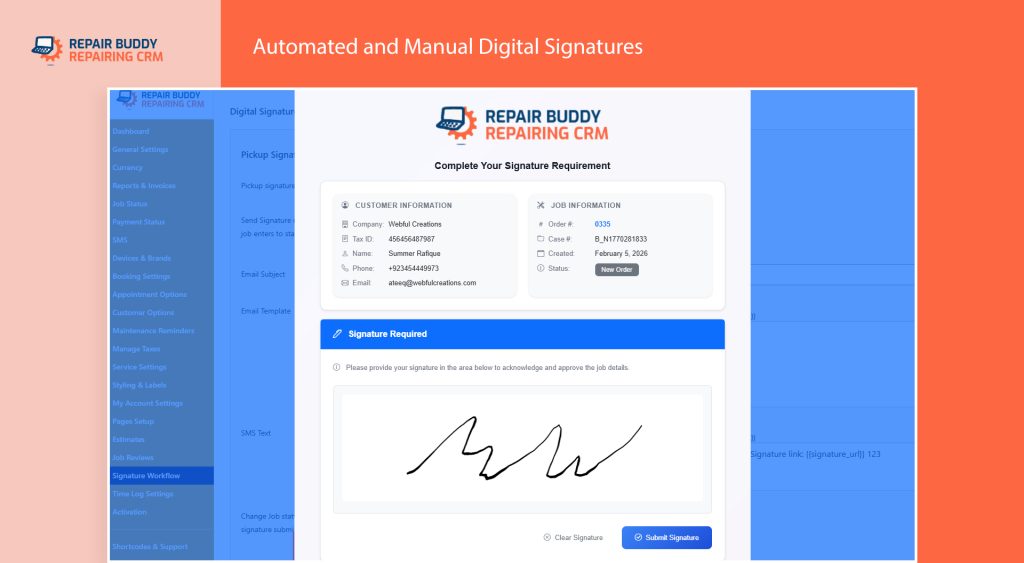
Many modern repair businesses have replaced paper intake forms with digital repair check-in systems that capture customer details, device information, photos, signatures, and repair notes in one place. This not only improves record keeping but also creates a smoother workflow for technicians and customer service staff.
If you’d like to learn how a complete digital intake process works—from customer drop-off through technician work orders and device pickup—read our detailed guide on Cell Phone Repair Intake Software: How to Automate Repair Intake and Work Order Tracking.
Creating a consistent intake process is one of the simplest improvements a repair shop can make, and it provides the foundation for every other part of your repair workflow.
Mistake #2: Relying on Paper Work Orders Instead of Digital Job Management
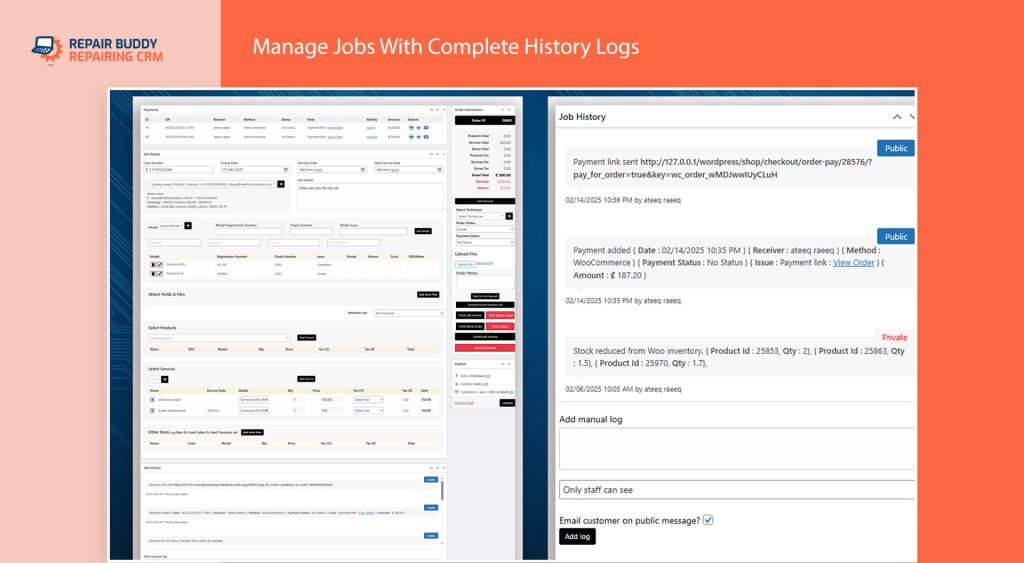
Once a repair has been checked in, the next challenge is making sure technicians have all the information they need to complete the job correctly. Unfortunately, many repair shops still depend on handwritten work orders, printed repair tickets, sticky notes, or verbal instructions passed between front desk staff and technicians.
While these methods may work for a handful of repairs each day, they quickly become inefficient as your business grows. Paperwork gets misplaced, handwriting can be difficult to read, repair notes are forgotten, and important customer requests are sometimes missed altogether.
Every communication mistake increases the risk of delays, incorrect repairs, repeat work, and unhappy customers.
Why Paper Work Orders Slow Down Repair Shops
Paper-based job management creates unnecessary friction throughout the repair process. Technicians often need to leave their workstation to ask questions, locate missing paperwork, or confirm customer instructions before continuing with a repair.
Common problems include:
- Missing or incomplete repair notes.
- Handwritten instructions that are difficult to read.
- Lost work orders delaying repairs.
- No visibility into technician workloads.
- Repair status updates that never reach the front desk.
- No record of who completed specific repair tasks.
As repair volume increases, these small interruptions add up to hours of lost productivity every week.
A Work Order Should Do More Than Assign a Repair
A professional work order isn’t just a job assignment. It should provide technicians with everything they need to complete the repair confidently, including customer notes, reported faults, intake photos, approved estimates, required replacement parts, and any special instructions collected during check-in.
When all of this information is available in one place, technicians spend less time asking questions and more time repairing devices.
Create Better Communication Between Staff and Technicians
One of the biggest advantages of digital job management is that everyone works from the same information. Front desk staff, technicians, and business owners can all view the current repair status, technician notes, customer messages, and repair history without relying on verbal updates or paper files.
This reduces misunderstandings while ensuring that important information isn’t lost as a repair moves through different stages of the workflow.
Improve Technician Accountability
Clear work orders also improve accountability within the workshop. Each repair can be assigned to a specific technician, making it easier to monitor workloads, review completed repairs, and identify opportunities to improve efficiency.
Many repair businesses also benefit from tracking labour time, documenting repair progress, and recording completed quality checks before returning a device to the customer. These simple practices create more consistent repair standards while helping managers understand how their workshop is performing.
Digital Job Management Helps Repair Shops Scale
The difference between a small repair shop and a growing repair business is often the quality of its internal processes. Standardized digital work orders reduce communication errors, improve technician productivity, and make it much easier to manage higher repair volumes without adding unnecessary administrative work.
As your business grows, organized job management becomes one of the most valuable investments you can make in your overall repair shop workflow.
Mistake #3: Poor Inventory Management Is Quietly Reducing Your Profits
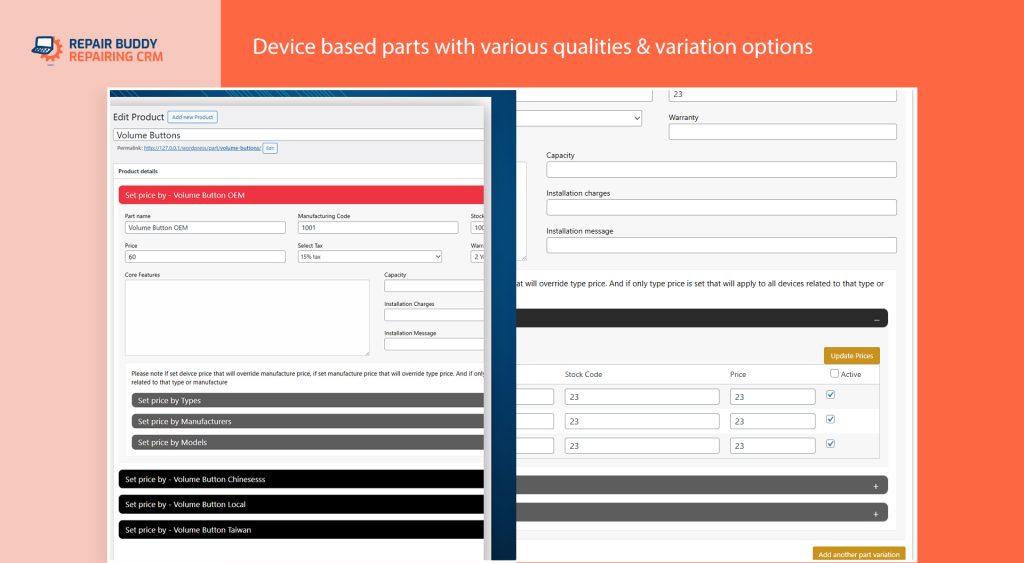
Inventory is one of the largest investments for any phone repair business. Every screen, battery, charging port, camera module, and replacement component sitting on your shelves represents money tied up in stock. Without proper inventory management, it’s surprisingly easy for repair shops to lose profit without even noticing.
Many independent repair shops still manage inventory using spreadsheets, handwritten notes, or memory. While these methods may work in the early stages of a business, they quickly become unreliable as repair volume increases and more technicians begin using the same stock.
The Real Cost of Poor Inventory Management
Inventory problems don’t always appear as obvious losses. Instead, they often show up as delayed repairs, unnecessary purchases, frustrated customers, and shrinking profit margins.
Some of the most common inventory challenges include:
- Ordering replacement parts that are already in stock.
- Running out of frequently used components unexpectedly.
- Keeping slow-moving inventory that ties up valuable cash.
- Not knowing the true cost of individual repairs.
- Replacement parts being used without being recorded.
- Difficulty tracking which parts were installed in each repair.
These issues affect more than just inventory—they impact customer satisfaction, technician productivity, and overall business profitability.
Inventory Problems Usually Start Small
One missing screen protector or forgotten battery might not seem important, but small inventory errors accumulate over time. As repair volume grows, these inconsistencies become increasingly difficult to track, making it harder to understand where your profits are really going.
Connect Parts to Every Repair
One of the simplest ways to improve inventory accuracy is by ensuring every replacement part is linked to a specific repair ticket. This creates a complete history showing which components were installed, who performed the repair, and when the work was completed.
Maintaining this information also makes warranty claims easier to manage and helps technicians identify previous repairs when customers return in the future.
Know Your True Repair Costs
Successful repair shops don’t rely on guesswork when setting prices. Understanding the actual cost of every repair—including replacement parts, labour time, and additional expenses—allows business owners to price services more accurately while protecting their profit margins.
When inventory is tracked correctly, managers can quickly identify which repairs are the most profitable, which parts require frequent reordering, and which products are sitting on the shelf for too long.
Improve Purchasing Decisions
Better inventory records also lead to better purchasing decisions. Instead of ordering parts based on assumptions, repair shop owners can make informed decisions using actual usage patterns, seasonal demand, and repair history.
This reduces unnecessary stock while ensuring popular replacement parts remain available when customers need them.
Inventory Management Supports Better Customer Service
Customers expect accurate repair time estimates. When technicians know replacement parts are available before beginning a repair, they can provide more reliable completion times and avoid unexpected delays caused by missing inventory.
A well-organized inventory system not only improves workshop efficiency but also helps build customer confidence by delivering repairs on schedule.
Good Inventory Management Supports Business Growth
As your repair business grows, inventory management becomes increasingly important. Organized stock control reduces waste, improves cash flow, supports faster repairs, and gives business owners greater visibility into the financial health of their workshop.
For many repair shops, improving inventory management is one of the fastest ways to increase profitability without increasing repair prices.
Mistake #4: Letting Customer Status Calls Interrupt Your Team All Day
One of the biggest hidden productivity killers in a busy phone repair shop isn’t repairing devices—it’s answering the same question over and over again.
“Is my phone ready yet?”
While every customer simply wants an update, frequent status enquiry calls constantly interrupt front desk staff and technicians. Every phone call breaks concentration, slows repairs, and reduces the amount of productive work completed throughout the day.
As your repair volume increases, these interruptions become even more difficult to manage. Instead of focusing on repairs, your team spends valuable time answering routine questions that could easily be handled automatically.
Why Poor Communication Creates More Phone Calls
Most customers don’t actually enjoy calling repair shops—they simply want reassurance that their device is progressing. When customers don’t receive proactive updates, they naturally contact the business themselves.
Common reasons customers call include:
- Checking whether diagnostics have been completed.
- Confirming that replacement parts have arrived.
- Finding out if a repair estimate has been approved.
- Asking when their device will be ready for collection.
- Requesting updates after several days without communication.
Although each call may only last a few minutes, dozens of interruptions every day quickly consume hours of staff time.
Good Communication Reduces Support Work
The easiest way to reduce incoming status calls is to provide customers with updates before they feel the need to ask. When customers know exactly where their repair stands, they gain confidence in your business and are far less likely to contact your staff for routine progress reports.
Keep Customers Informed Automatically
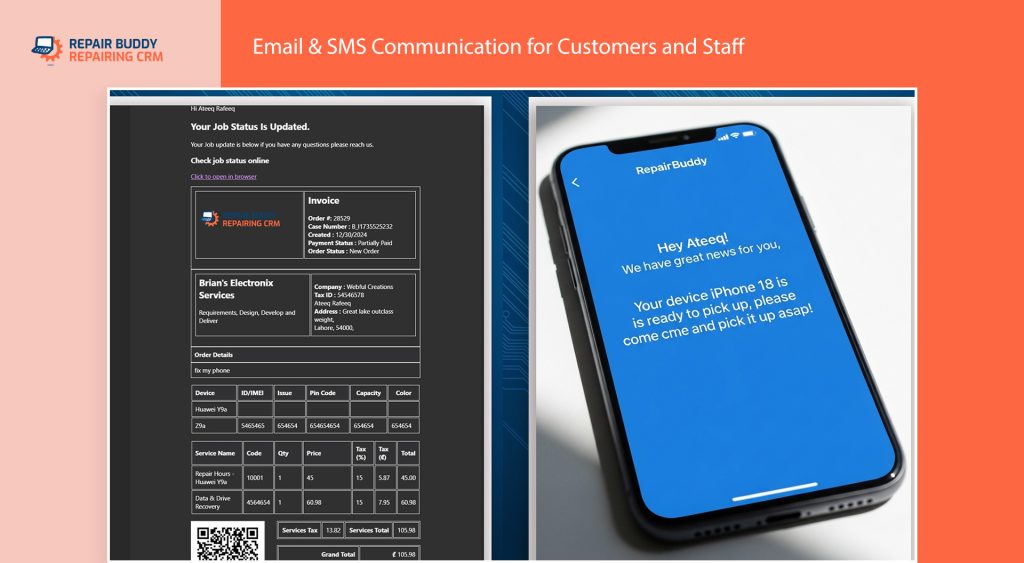
Many modern repair shops now use automated communication throughout the repair process. Customers receive notifications when a repair is booked, when diagnostics are complete, when an estimate is ready for approval, when technicians begin work, and when the repair is ready for collection.
Providing regular updates improves transparency while significantly reducing unnecessary phone calls and emails.
Offer Online Repair Status Tracking
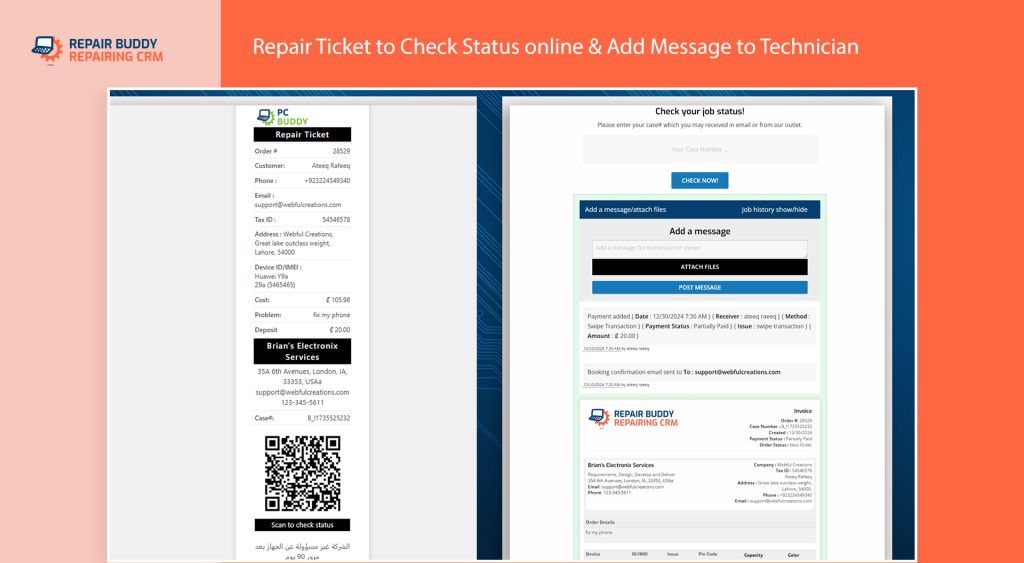
One of the most effective ways to improve customer communication is by offering an online repair status page where customers can check progress themselves using their repair ticket or case number.
This simple self-service feature gives customers instant access to repair updates 24 hours a day without needing to contact your shop.
If you’d like to see how an online repair tracking system works, you can explore the live Repair Status Demo, which demonstrates how customers can check the progress of their repairs online.
Better Communication Creates Better Customer Experiences
Keeping customers informed isn’t just about reducing phone calls—it’s about building trust. Transparent communication shows customers that their device is being professionally managed and that your repair shop values their time.
Shops that consistently communicate throughout the repair process often receive better reviews, experience fewer complaints, and build stronger long-term customer relationships.
Less Time on the Phone Means More Time Repairing Devices
Reducing unnecessary status enquiries allows technicians to stay focused on repairs while giving front desk staff more time to assist walk-in customers and manage new bookings. Small improvements in communication can have a surprisingly large impact on workshop productivity and overall customer satisfaction.
Mistake #5: Operating Without a Standard Technician Workflow
Many repair shop owners invest time improving customer service and marketing, but overlook what happens after a device reaches the workshop. Without a standardized technician workflow, every repair can be handled differently depending on who is assigned the job.

One technician may document every repair thoroughly, while another relies on memory. Some perform comprehensive testing before returning a device to the customer, while others only verify the original fault. These inconsistencies can lead to avoidable mistakes, repeat repairs, warranty disputes, and varying levels of service quality.
Creating a consistent workflow ensures that every repair follows the same professional process—from diagnosis to final quality checks—regardless of which technician performs the work.
Every Repair Should Follow the Same Process
A standardized technician workflow removes guesswork and helps every member of your team work more efficiently. Instead of relying on individual habits, technicians follow an established process that improves quality and accountability.
A typical workflow may include:
- Reviewing the customer’s reported issue and repair notes.
- Performing an initial device inspection.
- Documenting existing cosmetic or functional damage.
- Completing diagnostics before beginning repairs.
- Recording replacement parts used during the repair.
- Testing all relevant device functions after the repair.
- Updating the repair status for front desk staff and customers.
- Preparing the device for collection with final quality checks.
When every technician follows the same process, repair quality becomes more consistent across the entire business.
Consistency Is More Valuable Than Speed
Completing repairs quickly is important, but consistency is what builds a long-term reputation. A documented workflow helps reduce human error while ensuring that important inspection and testing steps are never skipped—even during busy periods.
Protect Your Business with Better Documentation
One of the most effective ways to reduce customer disputes is by documenting the condition of every device before and after repair. Recording existing scratches, cracks, bent frames, Face ID issues, charging problems, or water damage creates a clear history that protects both your technicians and your business.
Many successful repair shops also use pre-repair and post-repair evaluation checklists to verify that key device functions have been tested before returning the phone to the customer.
Track Technician Performance
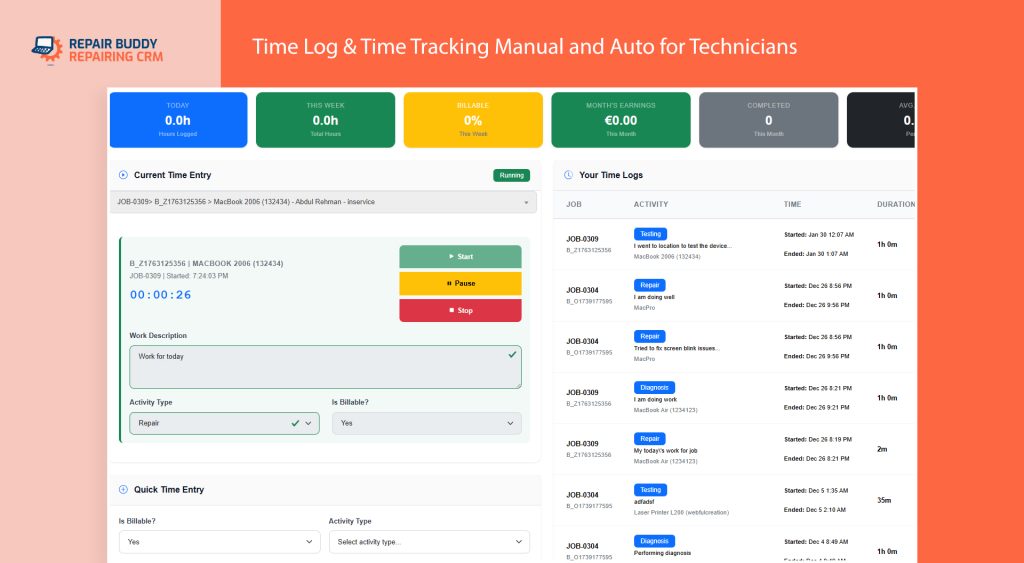
As your business grows, understanding technician productivity becomes increasingly important. Tracking labour time, completed repairs, repair turnaround times, and technician workloads provides valuable insight into how efficiently your workshop operates.
These measurements are not about micromanaging employees—they help identify training opportunities, balance workloads, improve scheduling, and maintain consistent service standards across the entire repair team.
Communication Keeps Repairs Moving
Technicians should also have a simple way to communicate progress throughout the repair. Recording diagnostic results, adding repair notes, requesting additional parts, or reporting unexpected issues helps front desk staff provide accurate updates to customers without interrupting technicians while they work.
Good internal communication reduces misunderstandings and ensures everyone involved in the repair has access to the latest information.
Professional Workflows Lead to Better Customer Experiences
Customers may never see your workshop, but they notice the results of an organized repair process. Faster turnaround times, consistent repair quality, accurate updates, and fewer repeat visits all contribute to a better customer experience and stronger online reviews.
By implementing a standardized technician workflow, repair shop owners create a more efficient workshop while building a reputation for reliable, professional service.
Mistake #6: Delaying Repairs with Slow Estimate Approval Processes
Not every repair can begin immediately. After technicians complete diagnostics, they often discover additional faults or identify replacement parts that weren’t included in the original repair request. Before proceeding, the customer needs to approve the updated estimate.
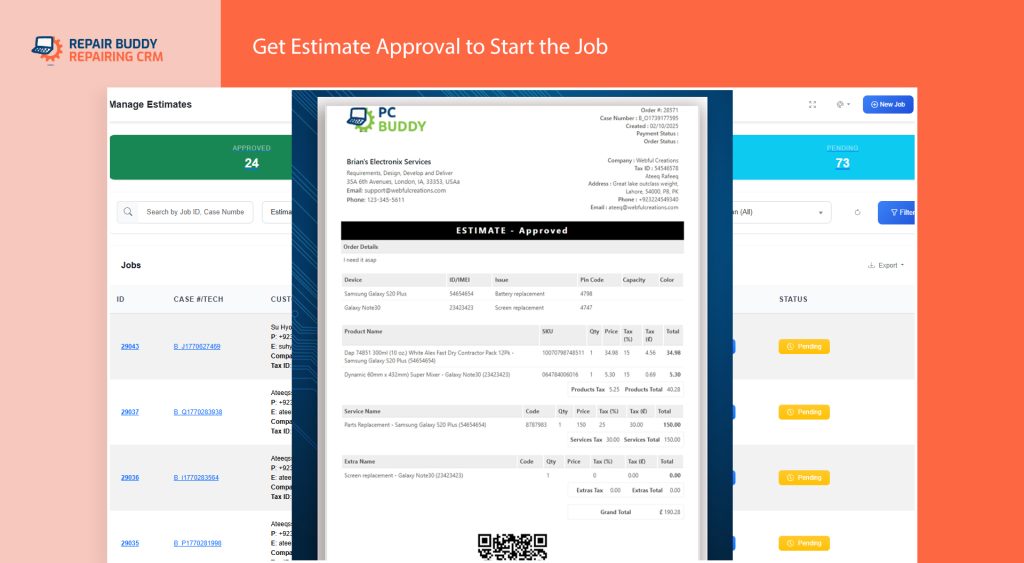
For many repair shops, this stage becomes an unnecessary bottleneck. Staff repeatedly call customers, leave voicemail messages, wait for return calls, or exchange multiple text messages before receiving approval. Meanwhile, the device sits on the shelf, replacement parts aren’t ordered, and technicians move on to other repairs.
These delays increase repair turnaround times, reduce workshop efficiency, and create frustration for both customers and staff.
Why Approval Delays Hurt Your Business
Waiting for customer authorization affects far more than a single repair. Every delayed estimate creates a ripple effect throughout your workshop.
Common problems include:
- Devices waiting days for customer approval.
- Replacement parts ordered later than necessary.
- Technicians frequently stopping work to follow up with customers.
- Longer repair turnaround times.
- Reduced workshop capacity during busy periods.
- Customers becoming frustrated due to poor communication.
While each delay may seem minor, the combined effect can significantly reduce the number of repairs your business completes each week.
Faster Decisions Keep Repairs Moving
The quicker customers can review and approve repair estimates, the sooner technicians can begin work and replacement parts can be allocated. Eliminating approval delays is one of the easiest ways to improve repair turnaround times without hiring additional staff.
Provide Clear, Professional Repair Estimates
Customers are much more likely to approve repairs quickly when estimates clearly explain the work being performed, the replacement parts required, labour costs, and the expected completion time.
Transparency builds confidence and reduces unnecessary questions before approval is given.
Digital Estimate Approval Simplifies the Process
Many modern repair businesses now send repair estimates electronically, allowing customers to review and approve them online from any device. Instead of waiting for phone calls during business hours, customers can respond whenever it’s convenient.
This creates a documented approval record while allowing technicians to continue working as soon as authorization is received.
Improve Customer Confidence Through Better Communication
Estimate approvals are also an opportunity to strengthen customer trust. Explaining why additional repairs are recommended, providing accurate pricing, and communicating expected timelines helps customers make informed decisions while reducing misunderstandings later in the repair process.
Customers appreciate transparency, especially when unexpected repair costs arise after diagnostics.
Small Improvements Can Significantly Reduce Turnaround Time
Many repair shop owners focus on completing repairs faster, but reducing delays before repairs even begin can have an even greater impact. Streamlining your estimate approval process allows technicians to spend more time repairing devices and less time waiting for customer responses.
Combined with organized repair intake, digital work orders, inventory management, and better communication, an efficient estimate approval process becomes another important step toward building a more productive and profitable repair business.
Mistake #7: Treating Every Customer Like a One-Time Customer
For many phone repair shops, the relationship with a customer ends the moment a repaired device is collected and the invoice is paid. While completing the repair is important, it shouldn’t be the end of the customer journey.
Acquiring a new customer is often far more expensive than keeping an existing one. Customers who have already trusted your business once are much more likely to return for future repairs, recommend your shop to friends and family, or leave positive online reviews that attract new customers.
Successful repair businesses understand that every completed repair is the beginning of a long-term customer relationship—not the end of one.
Why Customer Retention Matters
Most people own multiple devices, and those devices eventually require maintenance or repair. A customer who visits your shop today for a screen replacement may return months later for a battery replacement, charging port repair, tablet repair, or even recommend your business when someone else needs help.
Building long-term relationships creates a more stable business and reduces your dependence on constantly finding new customers.
Simple Ways to Stay Connected with Customers
You don’t need an aggressive marketing strategy to encourage repeat business. Small, timely interactions often make the biggest difference.
- Send a thank-you message after the repair is completed.
- Request an honest Google review while the experience is still fresh.
- Keep a complete repair history for future reference.
- Send maintenance or battery replacement reminders when appropriate.
- Make it easy for returning customers to book another repair.
Your Best Marketing Asset Is a Happy Customer
Word-of-mouth referrals remain one of the most effective ways to grow a local repair business. Customers who receive excellent service are more likely to recommend your shop to friends, family, and colleagues—especially when the entire repair experience is smooth, transparent, and professional.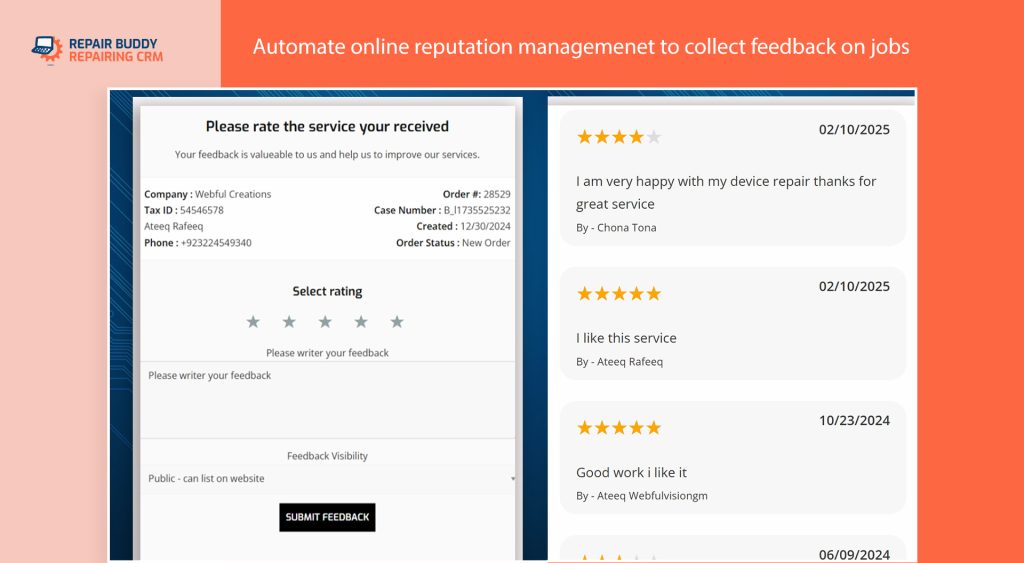
When people search for a local phone repair shop, online reviews often play a major role in their decision. Consistently asking satisfied customers for feedback helps build trust with potential customers while improving your visibility in local search results.
Even a small increase in positive reviews can make a noticeable difference when customers compare repair shops in their area.
Maintain a Complete Customer History
Keeping a record of previous repairs makes future visits faster and more convenient. Instead of asking customers to explain past repairs, your team can quickly review repair history, replacement parts used, previous invoices, and warranty information.
This not only improves customer service but also demonstrates professionalism and attention to detail.
Growth Comes from Great Systems, Not Just Great Repairs
Repair quality will always be the foundation of a successful repair business, but long-term growth depends on the systems surrounding those repairs. Businesses that consistently communicate with customers, maintain organized records, encourage reviews, and simplify repeat bookings are far more likely to build lasting customer relationships.
By treating every repair as the start of an ongoing relationship rather than a one-time transaction, repair shop owners create stronger customer loyalty and a more sustainable business.
What High-Performing Phone Repair Shops Do Differently
After working with repair businesses of all sizes, one thing becomes clear: successful repair shops don’t necessarily have the best technicians—they have the best systems.

As repair volume grows, relying on memory, paper notes, and manual processes becomes increasingly difficult. High-performing repair businesses build standardized workflows that allow every repair to follow the same process while giving staff the tools they need to work efficiently.
Rather than constantly reacting to problems, they focus on preventing them.
Successful Repair Shops Standardize Their Workflow
Whether a shop completes ten repairs per week or one hundred repairs per day, the most successful businesses ensure every repair follows a consistent process.
- Every device is checked in using the same intake procedure.
- Technicians receive complete repair information before beginning work.
- Replacement parts are recorded against each repair.
- Customers receive regular progress updates.
- Repairs are tested before being returned to customers.
- Invoices, payments, and repair history are stored for future reference.
This consistency improves customer satisfaction while making it easier to train new employees and maintain high repair standards.
Automation Eliminates Repetitive Administrative Tasks
Many of the daily tasks performed in a repair shop don’t directly generate revenue. Calling customers with updates, manually creating invoices, writing repair tickets, checking appointment calendars, and answering routine status enquiries all consume valuable time.
Modern repair businesses automate many of these repetitive tasks, allowing technicians to focus on repairs while front desk staff spend more time assisting customers instead of completing paperwork.
Data Helps Owners Make Better Business Decisions
Successful repair shop owners don’t rely on guesswork. They regularly review business performance by tracking repair volume, technician productivity, inventory usage, turnaround times, and customer satisfaction.
Having access to accurate information makes it easier to identify bottlenecks, improve profitability, forecast inventory requirements, and make informed business decisions.
Technology Supports Growth Without Increasing Complexity
As a repair business expands, adding more technicians or opening additional locations becomes much easier when standardized systems are already in place. Digital workflows allow businesses to scale while maintaining consistent service quality and reducing administrative overhead.
Instead of creating more paperwork, technology helps simplify operations and improve communication across the entire business.
The Goal Isn’t Just Faster Repairs—It’s a Better Business
Repair shops that invest in organized processes often experience benefits far beyond faster turnaround times. They reduce customer disputes, improve technician productivity, strengthen customer relationships, generate more positive reviews, and create a business that’s easier to manage and more profitable over the long term.
Whether you’re running a small independent repair shop or planning to expand into multiple locations, building reliable systems today creates a stronger foundation for future growth.
Recommended Resources for Phone Repair Shop Owners
If you’re looking to improve your repair shop’s workflow, automate repetitive tasks, or simply learn more about modern repair management, the following resources provide practical guidance and live demonstrations of the concepts discussed in this article.
📘 Cell Phone Repair Shop Software
Discover how an all-in-one repair shop management platform can help organize repair intake, technician work orders, inventory management, customer communication, invoicing, appointment scheduling, and repair tracking.
📱 Complete Guide to Cell Phone Repair Intake Software
Want to learn exactly how modern repair shops automate the repair intake process? This comprehensive guide walks through every stage of the workflow—from online booking and customer check-in to technician work orders, repair approvals, invoicing, and final device pickup.
🖥️ Try the Interactive Repair Shop Demo
Experience the customer-facing side of a modern repair business. Book a repair, browse supported devices, check repair status, and explore the workflow your customers would use when your shop is powered by professional repair management software.
🎥 Watch the Complete Software Demonstration
See the entire repair workflow in action, including online booking, repair intake, technician work orders, repair estimates, inventory allocation, customer communication, invoicing, QR code status tracking, digital signatures, and more.
Final Thoughts
Running a successful phone repair business isn’t just about fixing devices—it’s about building efficient systems that help your team deliver consistent, professional service every day.
By standardizing repair intake, improving technician workflows, organizing inventory, streamlining customer communication, simplifying estimate approvals, and maintaining strong relationships after every repair, you can eliminate many of the operational challenges that slow down growing repair businesses.
Whether you’re managing a small independent repair shop or expanding into multiple locations, investing in better repair shop management processes today will help improve productivity, increase customer satisfaction, and support long-term business growth.
The best repair shops don’t simply work harder—they build smarter systems that allow every repair to move smoothly from customer drop-off to final pickup.