
Auto Repair Shop Management: How to Organize Jobs, Customers, and Daily Operations
Running an auto repair shop requires more than skilled mechanics and the right tools. Shop owners must coordinate customer bookings, inspect vehicles, prepare estimates, assign repair jobs, track progress, manage payments, and make sure customers know what is happening with their vehicles.
When a workshop handles only a few vehicles each day, paper forms and spreadsheets might seem sufficient. But as the business grows, keeping track of every repair becomes increasingly difficult. Important details can get lost, estimates may wait too long for approval, and technicians may spend valuable time searching for job information instead of working on vehicles.
Effective auto repair shop management means creating a consistent process for handling these responsibilities, from the first customer enquiry to vehicle delivery and future maintenance.
Whether you operate an independent garage or manage a growing automotive workshop, this guide explains practical ways to organize daily operations, improve repair job tracking, and build a more efficient business.
1. Create a Consistent Vehicle Intake Process
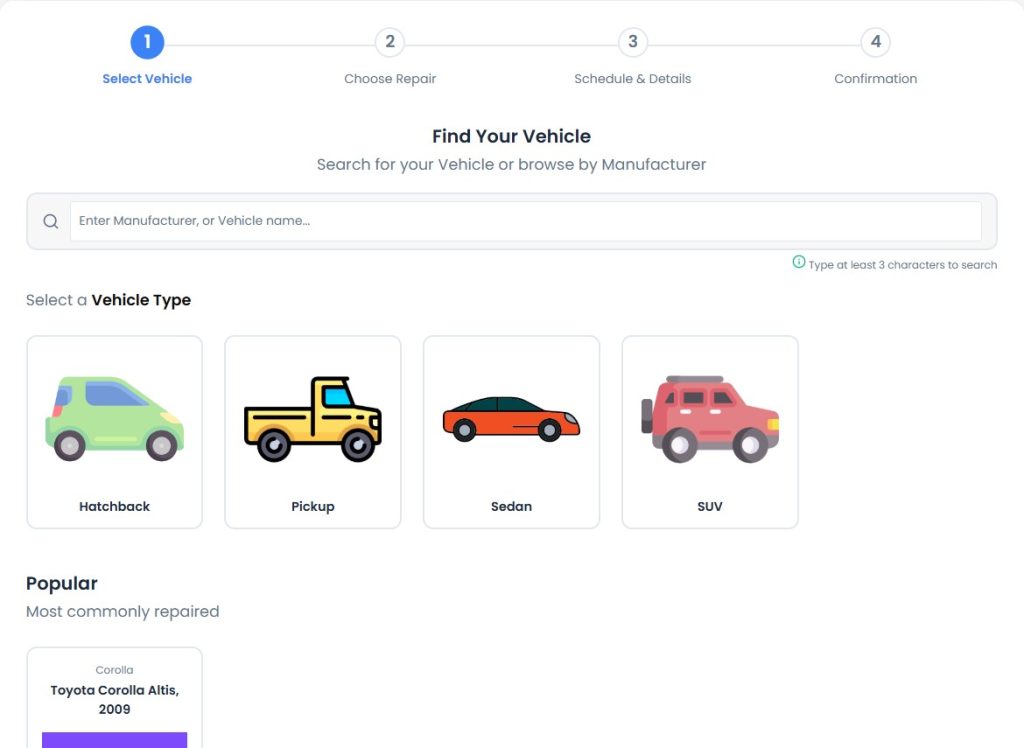
Every repair begins with a customer and a vehicle that needs attention. The information collected at intake helps the shop understand the requested work, identify the vehicle, and organize the next steps.
Without a consistent intake process, staff may record important details in different places, making them difficult to find later.
A reliable vehicle intake process should capture:
- Customer name and contact information.
- Vehicle registration number and identifying details.
- Odometer reading and relevant vehicle information.
- The customer’s description of the problem.
- Requested services or maintenance.
- Appointment, pickup, and expected delivery details.
- Relevant photographs, documents, or inspection notes.
The exact information needed will depend on the type of repair and the shop’s workflow.
The important point is to record the information consistently and associate it with the correct customer and repair job.
Make booking easier for customers
An online booking process can help customers submit repair requests without relying entirely on telephone calls or walk-in visits. It also gives the shop an opportunity to collect useful information before the vehicle arrives.
Staff should review incoming requests, confirm the details, and make sure the relevant information is available when the vehicle is received.
RepairBuddy supports online repair bookings and job management, helping repair businesses connect customer requests with their wider repair workflow.
2. Keep Customer and Vehicle Records Organized
A repair shop builds valuable information every time it services a vehicle. Customer details, vehicle records, previous jobs, invoices, and service dates can help staff understand the customer’s history and prepare for future visits.
When this information is scattered across notebooks, spreadsheets, email conversations, and separate files, finding it can become unnecessarily time-consuming.
A more organized system keeps customer and repair information connected.
For each repair, staff should be able to identify the customer, locate the relevant vehicle details, review the current job status, and find the associated records.
Where appropriate, record vehicle details such as:
- Registration number.
- Vehicle color and model year.
- Odometer reading.
- Pre-repair evaluation.
- Post-repair evaluation.
- Services and parts associated with the job.
For businesses that service multiple vehicles for the same customer, it is particularly useful to maintain clear records for each vehicle.
Organized records also make it easier to understand the history of a repair when a customer returns with a question or requests additional work.
3. Prepare Clear Repair Estimates Before Starting Work
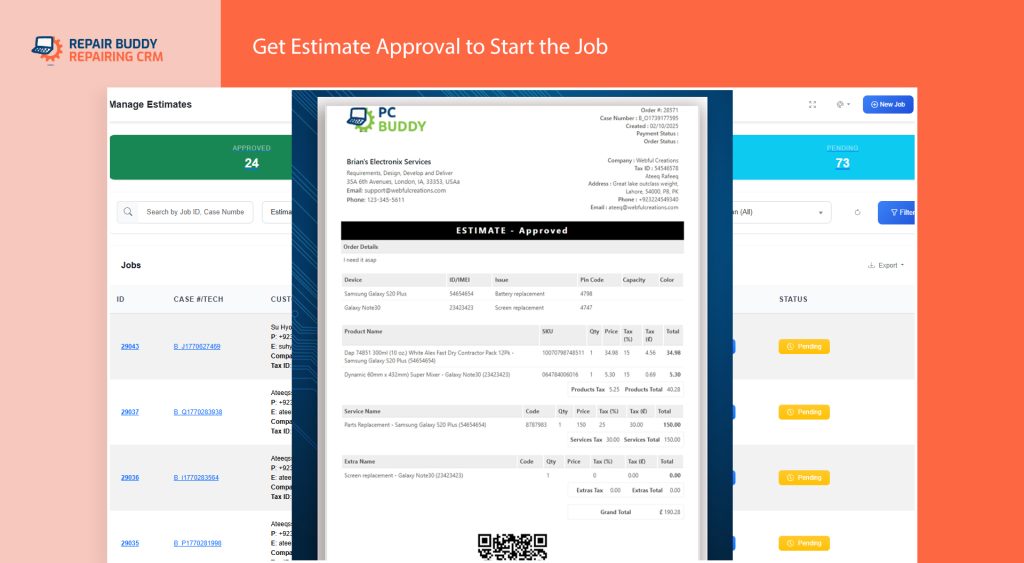
One of the most important parts of auto repair shop management is agreeing on the work and its cost before proceeding.
Customers want to understand what needs to be repaired, which parts are required, how labor is charged, and what the expected total will be.
A clear estimate helps establish expectations and gives the customer an opportunity to approve or reject the proposed work.
A repair estimate may include:
- Services and labor charges.
- Required parts.
- Additional items or charges.
- Applicable taxes.
- The estimated total.
The estimate should explain the proposed work in language the customer can understand. If further issues are discovered during inspection, the shop should communicate any necessary changes and obtain the appropriate authorization before proceeding.
Avoid delays caused by manual approval processes
When estimates are written on paper or sent through disconnected communication channels, staff may struggle to determine whether the customer has approved the work.
A structured digital process helps keep the estimate and its approval status connected to the repair.
RepairBuddy supports estimates created manually or from online bookings. Customers can approve or reject estimates through the available workflow, and shops can optionally request a signature during approval. When an estimate is rejected, the shop can also collect the customer’s reason.
Read our practical guide to creating car repair estimates customers understand and approve for more details.
4. Track Every Repair Job From Start to Finish
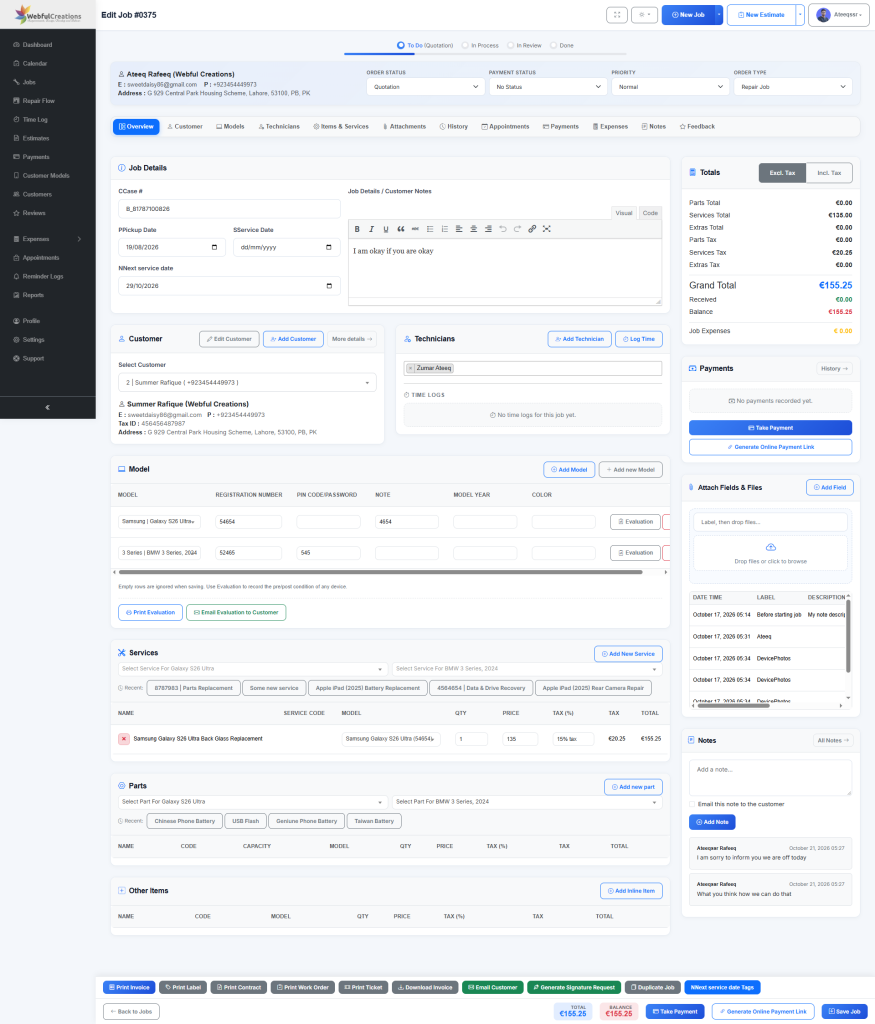
A vehicle entering the workshop is only the beginning of the process. The shop must keep track of what needs to happen next, who is responsible, and whether the repair is progressing as expected.
Without clear job statuses, managers may need to ask technicians for updates or search through multiple records to understand which vehicles are still waiting.
A consistent job workflow should make it clear whether a repair is:
- Newly received.
- Awaiting a quotation or approval.
- In progress.
- Waiting for parts.
- Ready for inspection or quality checks.
- Completed or delivered.
- Cancelled.
The exact statuses can vary between workshops, but everyone should understand what each status means and when it should be changed.
Use a visual repair workflow
A visual job board can help managers understand the overall workload without opening every repair record.
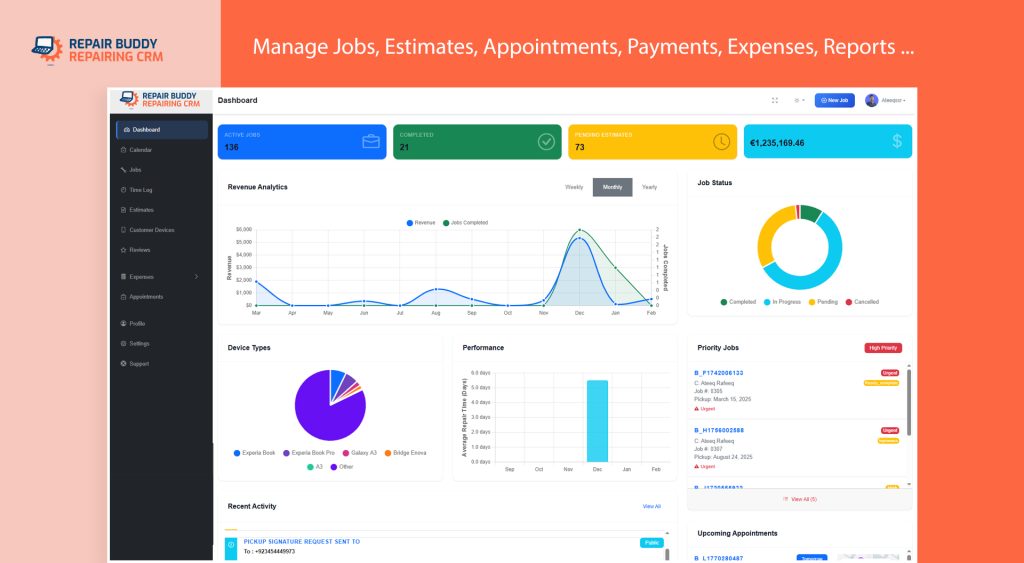
RepairBuddy provides a five-stage repair board: To Do, In Process, In Review, Done, and Cancelled. Administrators can configure the statuses associated with each stage to match their workflow.
For example, a job waiting for parts can be distinguished from a repair actively being worked on. A completed job can be separated from one that still needs a final review.
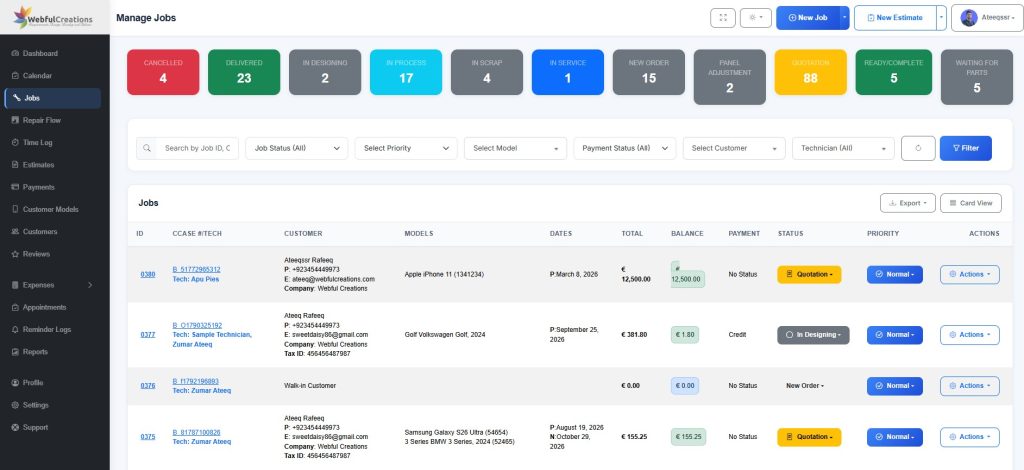
The Manage Jobs screen also supports searching and filtering by job ID, case number, customer, vehicle, status, priority, payment status, and assigned technician.
This makes it easier to find specific jobs and review the work that needs attention.
For a more detailed explanation, see how to manage auto repair jobs and work orders efficiently.
5. Assign Work Clearly and Coordinate Technicians
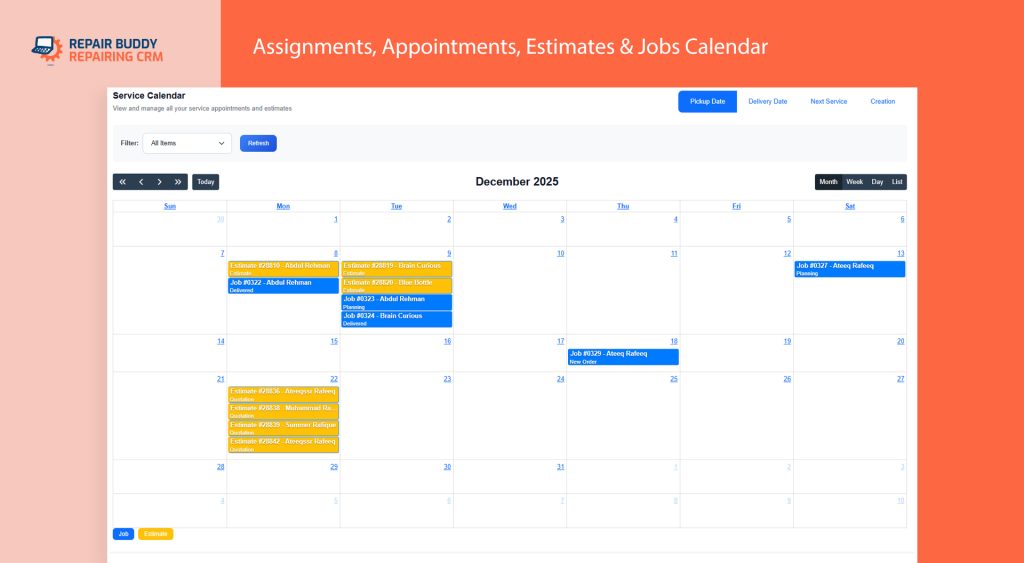
Even a small workshop benefits from clear responsibility for each repair.
When several technicians work in the same garage, everyone needs to know which jobs they are responsible for and what work remains to be completed.
A good process includes:
- Assigning the relevant technician or technicians to each job.
- Recording the work that needs to be carried out.
- Making relevant vehicle and repair details available.
- Updating the job status as work progresses.
- Recording time logs where the shop uses them.
- Reviewing the job before it moves to the next stage.
Work orders are particularly useful because they provide technicians with a document focused on the repair.
RepairBuddy supports assigning multiple technicians to a job and reviewing associated time logs where technicians track their work. Its technician work order excludes the customer’s address, telephone number, email address, and prices, keeping the document focused on the work required.
Clear assignments and accessible job information help reduce confusion and make it easier for managers to review the workshop’s workload.
6. Organize Parts, Services, and Repair Documentation
A repair job may involve several services, replacement parts, additional items, and supporting documents. Keeping these details associated with the correct job helps the shop maintain an organized record.
For each repair, staff should be able to identify the work being performed and find the relevant documentation when needed.
Depending on the job, that may include:
- Services and labor.
- Parts and additional items.
- Before-repair and after-repair photographs.
- Vehicle evaluation reports.
- Customer contracts or other documents.
- Repair notes and instructions.
RepairBuddy lets staff add services, parts, and extras to jobs and associate files with the job record.
It also supports pre-repair and post-repair vehicle evaluations, with options to print or email evaluation reports to customers.
Documenting vehicle condition and keeping relevant files together helps staff refer back to the repair record if questions arise later.
It is also useful to maintain a consistent process for recording inspection findings and explaining additional work to customers when necessary.
7. Manage Appointments and Expected Delivery Dates
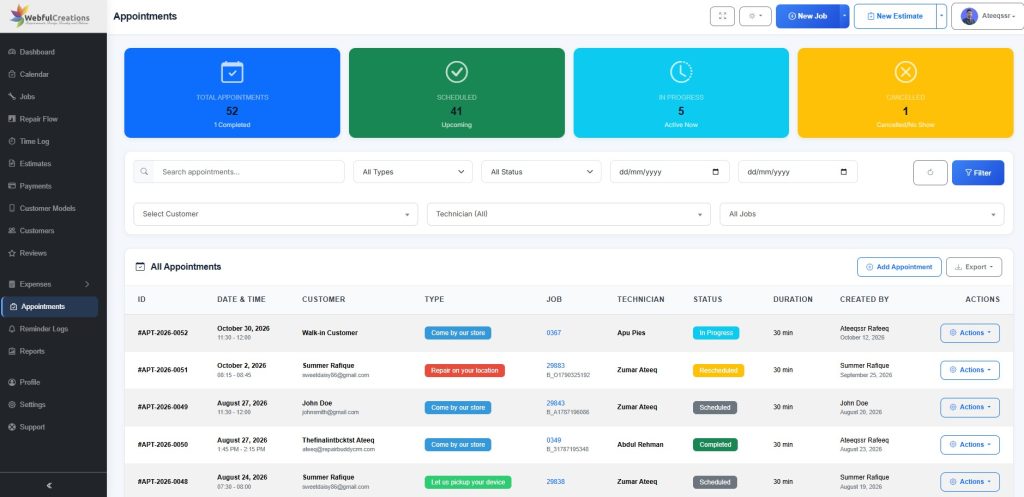
Scheduling is an important part of running a productive workshop. Repair shops need to coordinate vehicle drop-offs, inspections, repair work, and pickups while accounting for jobs that may take longer than expected.
A calendar helps staff see upcoming commitments and identify dates that require attention.
Useful scheduling information includes:
- Upcoming customer appointments.
- Job pickup dates.
- Expected delivery dates.
- Repair jobs requiring follow-up.
- Next service dates.
Staff should review upcoming appointments regularly and update relevant job information when plans change.
RepairBuddy includes a calendar that displays jobs, estimates, and appointments. Users can filter information by activity type, assigned work, and relevant dates, including job creation, pickup, delivery, and next service dates.
The dashboard also displays upcoming appointments relevant to the signed-in user’s access and responsibilities.
This gives managers and team members different ways to review the schedule and focus on the work they need to handle.
8. Make Customer Communication Part of the Workflow
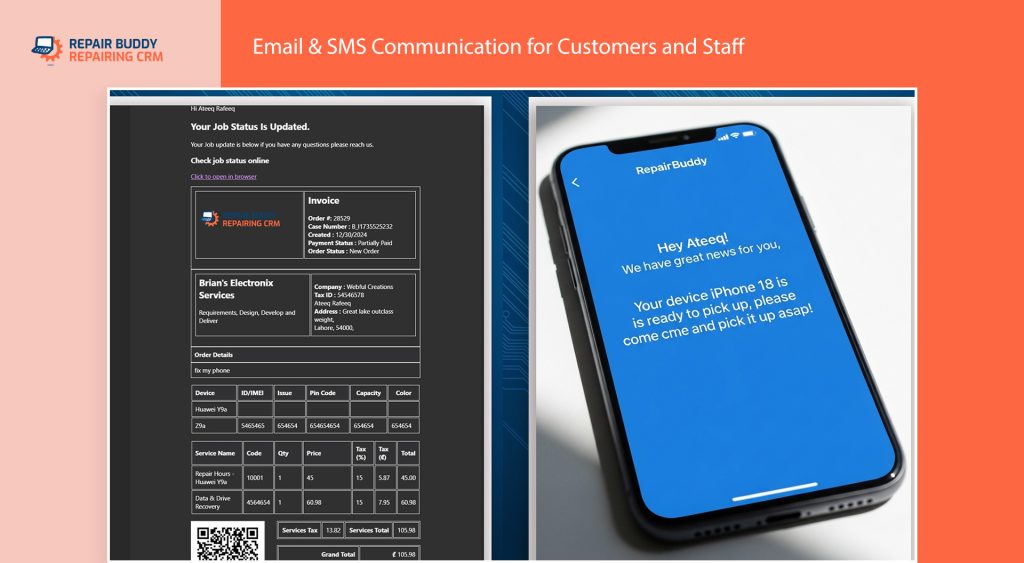
Customers can become frustrated when they do not know whether their vehicle has been inspected, whether an estimate has been approved, or whether the repair is ready for collection.
A workshop can improve the customer experience by making communication a regular part of its repair process.
For example, staff can communicate when:
- A vehicle has been received.
- An estimate is ready for review.
- Additional authorization is required.
- A repair status changes.
- The vehicle is ready for pickup.
- Follow-up service is due.
The specific messages and timing should reflect the shop’s actual workflow.
A repair management system can help by keeping communication options and job information connected.
RepairBuddy supports emailing customers, sending WhatsApp updates through the available workflow, and providing repair tickets that customers can use to check job status online.
These options give repair businesses practical ways to communicate without relying exclusively on customers calling the shop for updates.
9. Keep Payments, Invoices, and Expenses Organized
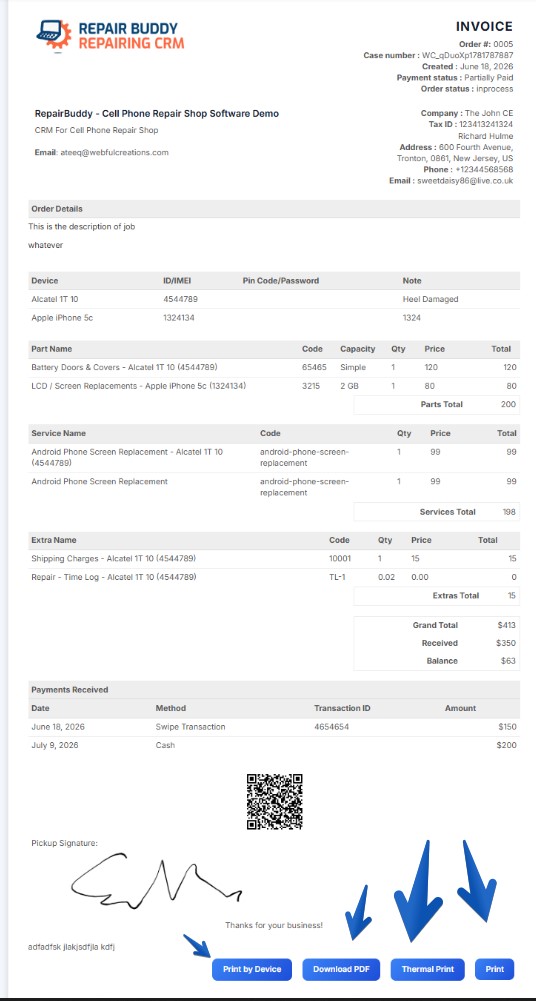
Completing a repair is only one part of running a successful automotive business. The shop also needs to maintain accurate records of payments, invoices, and expenses.
When financial information is disconnected from repair records, staff may have difficulty determining which jobs have outstanding balances or finding the relevant invoice.
A consistent process should include:
- Recording payments against the relevant job.
- Keeping invoices accessible.
- Reviewing payment status.
- Recording expenses associated with individual jobs.
- Providing customers with the appropriate invoice or payment information.
RepairBuddy supports online and offline job payments, invoice printing and PDF downloads, and job-related expense records.
These features help keep financial information connected to the repair record. Shops should still follow their established accounting procedures and ensure that their financial reporting is accurate.
10. Review Completed Jobs and Learn From Your Workflow
Job management should not stop when the vehicle is delivered.
Reviewing completed jobs helps shop owners understand how work moves through the workshop and identify areas where their process could improve.
Consider questions such as:
- Which jobs remain in progress longer than expected?
- Are many repairs waiting for parts?
- Are estimates frequently waiting for customer approval?
- Are technicians’ responsibilities clearly assigned?
- Are customers receiving updates at appropriate stages?
- Are payment records complete?
- Are next service dates recorded where appropriate?
RepairBuddy’s job records, status filters, history, and reporting features can support different aspects of reviewing business activity.
The goal is not simply to process more repairs. It is to build a repeatable workflow that helps the shop use its time effectively, maintain organized records, and deliver a consistent customer experience.
11. Turn Completed Repairs Into Long-Term Customer Relationships
A satisfied customer may return for future maintenance, recommend the business to others, or bring another vehicle to the shop.
However, repeat business is easier to encourage when the workshop maintains good records and follows up appropriately.
Useful practices include:
- Keeping customer and vehicle records organized.
- Recording the next service date when relevant.
- Requesting customer feedback after a repair.
- Maintaining clear repair and payment histories.
- Providing customers with useful information about their completed work.
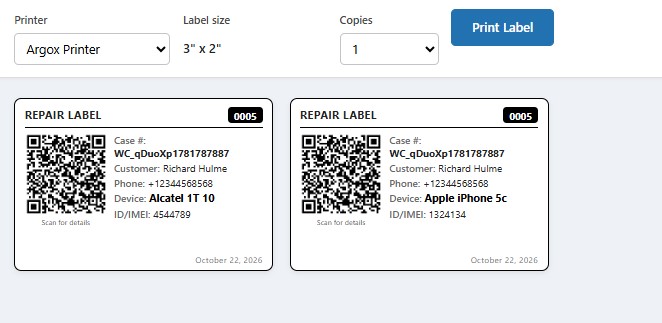
RepairBuddy supports next service dates, next service tag printing, and manual or automated feedback requests.
These features help shops incorporate follow-up into their existing repair management process rather than relying entirely on staff to remember every task.
12. When Should an Auto Repair Shop Consider Management Software?
Not every business needs a complicated system, but relying on manual processes becomes increasingly difficult as the number of customers, vehicles, technicians, and active jobs grows.
It may be time to consider dedicated software if your workshop frequently experiences problems such as:
- Searching through paperwork to find repair details.
- Losing track of job statuses.
- Following up manually on estimates.
- Difficulty coordinating technician assignments.
- Repeated customer calls asking about repair progress.
- Trouble finding invoices or payment records.
- Inconsistent vehicle inspection documentation.
- Forgetting customer feedback or future service follow-ups.
The right system should fit the way your business operates. Consider the tasks you need to manage, the information your team must access, the documents you use, and the level of visibility you need into daily work.
Why consider RepairBuddy for your auto repair shop?
RepairBuddy is repair shop management software available as a WordPress plugin, with a hosted cloud option for businesses that prefer a hosted setup.
Its features support several important workshop activities, including:
- Online repair bookings.
- Estimates and customer approval workflows.
- Repair jobs and work orders.
- Technician assignments and time logs.
- Vehicle records and evaluations.
- Services, parts, and extras.
- Appointments and calendar management.
- Payments, invoices, and job expenses.
- Customer communication and online job-status checking.
- Feedback requests and next service dates.
These features bring many day-to-day repair management activities into a connected workflow.
You can explore the dedicated Auto Repair Shop Software page to learn more about the available features.
Frequently Asked Questions
What is auto repair shop management?
Auto repair shop management involves coordinating the daily activities of an automotive workshop, including customer bookings, vehicle intake, estimates, technician assignments, job tracking, payments, customer communication, and future service.
How can I organize repair jobs in my workshop?
Start by recording each repair consistently, assigning a clear status, identifying the responsible technicians, and keeping vehicle details and job documentation together. Review the job list and upcoming appointments regularly to identify work that needs attention.
Why are digital repair estimates useful?
Digital estimates help shops organize proposed services, parts, additional items, taxes, and totals. They can also provide a structured process for customers to review and respond to an estimate.
How can repair shop software improve customer communication?
Depending on its features, repair shop software can help staff email customers, share updates, provide online job-status checking, and maintain repair records that are easier to reference when answering customer questions.
What should I look for in auto repair shop software?
Look for features that match your workshop’s actual requirements, such as booking, estimates, job tracking, technician assignments, vehicle records, work orders, invoicing, payments, customer communication, and reporting. Consider how easily the software fits into your existing website and workflow.
Can I use RepairBuddy on my WordPress website?
RepairBuddy is available as a WordPress plugin. A hosted cloud option is also available for businesses that prefer not to manage the software installation themselves.
Final Thoughts
Successful auto repair shop management depends on consistent processes, accessible information, clear responsibilities, and reliable communication.
By organizing vehicle intake, preparing understandable estimates, tracking repair jobs, coordinating technicians, maintaining financial records, and following up with customers, workshops can build a more manageable daily workflow.
Dedicated software can support these processes by connecting job information and giving authorized team members the tools they need to carry out their responsibilities.
If you want to explore how these workflows can be managed in one system, visit the RepairBuddy Auto Repair Shop Software page and review the features available for your workshop.